More specifically, if you can combine personalization with push notifications, then your eCommerce business will be able to drive engagement levels in the right direction.
They say the gold is in your email list, but people don’t give out their email address too easily these days.
The great thing about push notifications is that you don’t need to capture an email address. In fact, you don’t need any lead information at all!
People can subscribe to your web communications with just a single click. That means they don’t need to give over personal information, and you can gain instant subscribers with a single click.
It’s a win-win.
2. You Can Reach Thousands of Customers with Just a Single Click
By using push notifications, you can grab the attention of first-time visitors and casual browsers as soon as they arrive.
Offering them the chance to stay updated with the valuable content you’re providing without any need to give over their email address is a tempting proposition, and many people are willing to jump on-board.
This is a quick and easy way of building brand awareness. Furthermore, it takes very little time to create push notifications, especially compared to email.
3. Retarget Your Customers
One of the biggest challenges in ecommerce is dealing with abandoned carts. On mobile, these rates can soar as high as 97%, with online shoppers abandoning carts for all sorts of reasons, including:
High shipping costs
Hidden costs
A confusing checkout process
You could try cart abandonment emails. However, marketers are discovering that push notifications may be more effective, especially as they get higher open rates and click rates.
4. Remind Customers About You From Afar
Once people subscribe to your push notifications, you have a direct channel to communicate with them on their mobiles, even when they aren’t on your site or app.
There is no other marketing channel like this, making push notifications uniquely powerful in the hands of savvy marketers.
People can see your notifications on their mobile devices or desktop, and there is no need to open a mailbox to read or interact with it.
Studies by Responsys found 50% of mobile users subscribe to push notifications so they can gain access to special promotions and exclusive offers. Brands who offer time-limited deals can leverage the fear of missing out (FOMO) to lure users back to their ecommerce store.
5. Simple, Effective Brand Messaging
Here’s something you might not be aware of:
Online shoppers want to receive personalized content. They want brands to care more about them.
Personalized marketing is far more engaging now, and people will respond to content tailored to their needs and interests a lot faster than some meaningless, generic drivel.
The latter may actually turn people away, costing your subscribers and potential sales.
By personalizing your push notifications, you could boost open rates by around 400%. An easy way to put this into practice is by analyzing consumer behaviors and past purchases to serve up personalized product recommendations.
Did you know, your subscriber count can inevitably enhance your brand’s visibility in the online market and even drive more revenue? But, to get to that level and make your users to opt-in for push notifications, the road is often a rocky one with no clear direction sign-boards. So, how to go about it?
Here, in this post, we’ve compiled a list of smart opt-in push notifications for eCommerce marketing strategies with ample examples to help you get more subscribers through push messages and increase subscriber count. Do remember to A/B test and analyze your strategy using qualitative and quantitative tools to see what’s working best for your website and target audience.
Push Notifications Strategies For eCommerce
Mapping a User’s On-Site Activities and Other Actionables
To implement this smoothly, you can set unique actions to be taken before the opt-in appears. This is critical because your visitors need to realize the benefits of receiving your push notifications and the smooth experience they’ll get from your platform.
Finding the Best Pages to Launch the Opt-ins
You’d want to analyze your buyer’s or reader’s journey to understand your best-performing pages that are likely to convert your website visitors into subscribers. These assortments of pages could have different push notifications advertising styles when it comes to triggering the opt-ins.
Writing Succinct Permission Messages
The message in your opt-ins tells your visitors why they should subscribe to your push notifications. What this means is that the copy must clearly convey the benefits of receiving your push alerts.
Using Other Communication Channels to Encourage Subscriptions
Web push notifications are becoming omnipresent in the digital realm. And, a side effect of this is that a visitor may spontaneously refuse a website to send them notifications or worse, simply ignore it.
But, when you give the right context and build anticipation about what your web push notifications will offer, you’ll see an increase in opt-in rates. Hence, we reckon that you use other channels to promote details of the benefits of subscribing to push notifications. The benefits may be quick updates, discounts, or the latest trends.
You may also add links or buttons within other communication channels for your subscribers to reach the opt-in landing page. Newsletters, social media, and email are a few channels you can use to divert traffic to this landing page.
Using the Right Buttons and Links for Opt-ins
There are strategic ways you can get more subscribers by using buttons and links, especially in your other channels of communication, like emails, newsletters, and reports. If you implement them wisely, you’ll see a boost in your subscriber count. Take the example below to understand this clearly.
Adding Call-to-Action (CTA) Buttons on High Traffic Pages
Your customers/readers are likely to land on every other page on your website, be it product pages or category pages. The homepage is where the majority of your traffic is pulled to. Hence, it’s recommended to have a plain header or footer opt-in on those pages.
Mastering the Exit Intent
Wait! Check This Out Before You Leave You’ve worked hard to bring visitors to your website. But over 90% of them exit without performing a desired task, like subscribing or buying something. This means that they have not engaged with your website sufficiently. This, in turn, is a lost opportunity. But, when you apply an exit-intent strategy and how engaging push notifications, you’ll see more subscriptions and less bounce rate. Let’s explore this further!
Exit-intent technology identifies the perfect moment when a visitor is about to leave your website and launches a pop-up. You can set the pop-up to contain a discount, voucher, or an enticing offer, exclusive to new subscribers.
You may ask yourself, “Why should we use SMS Marketing?” The answer is simple: “Your customers are texting, so why aren’t you?” Text message marketing gives you the perfect opportunity to connect with your customers on the devices they carry with them all day, every day. If that’s not enough to get you to think about incorporating SMS Marketing into your marketing mix, here are 5 more reasons to consider.
SMS Marketing: connecting brands and customers
1. SMS is Personal
Your customers have a very personal relationship with their phones. It’s the way customers engage with their friends and family. In fact, it’s the very first thing most people reach for when they wake up. Once your brand is invited into this inner circle — caveat: you need permission — you’ll have an immediate, more intimate way to have a one-to-one conversation with your customer.
2. SMS is Simple
SMS Marketing provides brands with an uncomplicated way to connect with customers. It doesn’t get much simpler than sending a text. For marketers, though, the trick is to be able to have an engaging chat when limited to around 160 characters at a time. Brief messages featuring incentive contests, coupon redemption, opt-in surveys, and polls help move the conversation along. Tip: Include your SMS number or a shortcode on your direct mail, email, website, and social media pages. This can be a proven way to entice consumers to opt-in to your SMS marketing programs.
3. SMS is Highly Targeted
A consumer’s relationship with their phone, combined with a permission-based relationship with your brand, is a powerful marketing tool. Surprisingly, the majority of consumers are actually receptive to interacting with businesses via text, just like they do with their family and friends. With their permission, this receptive audience can be a lucrative one. But don’t overdo it. No one wants their phone swamped with unwanted texts. As a best practice, consider that more than 2–4 texts a month risks annoying your customer. If your offer is relevant and written specifically for the individual customer, you are sure to make a connection. You can also send a mass text — targeting a bigger audience — with a coupon or special offer they can’t resist.
4. SMS Outperforms Other Channels
SMS Marketing boasts greater immediacy and attention than other digital marketing methods: from open rates to delivery, SMS topples email, Facebook, and push notification. When compared to other advertising categories, according to Mobile Marketer, SMS Marketing can lead to higher engagement rates and enviable ROI. While SMS outperforms other channels by leaps and bounds, it’s even more effective when used in conjunction with voice, email, push notification, and other channels, as an integrated part of your digital and mobile marketing strategy.
5. SMS is Easy to Implement, Manage, and Track
With most SMS marketing tools, you can quickly and easily monitor and measure the performance of each SMS marketing campaign. Because Text Marketing is permission-based, you’re off to an excellent start: you know exactly who you are messaging and, because of that, you can capture highly specific data about your customers including demographics, interests, purchase history, and more! Proving marketing value is the holy grail for every marketer, and SMS Marketing, if properly integrated into your CRM, allows you to measure the real-time performance of your text messaging campaigns — even mass texting can be tracked with proficiency.
The volume of notifications that users receive daily is enormous. Therefore, it presents a ready opportunity for businesses to interact with their target segments on an elementary level.
However, there is a method in the madness, and one must know how to use push notifications wisely.
Why People Need These Notifications?
A typical user maintains a considerable number of apps on his or her smart devices.
Users usually forget how many apps they have on their devices and thus often miss out on updates and offers.
Notifications thus help the users to get organized.
These services help users prioritize things that should remain at the top of their agenda.
What are Push Notifications?
The clickable or actionable pop-up messages and the promotional material that you encounter daily on your browser or mobile phone screen are known as browser push notifications or simply push notifications.
Unlike the in-app notifications that are delivered by mobile apps, these notifications are automated communication messages delivered by the websites/apps directly to their users as home screen notifications.
Usually, these notifications contain a URL, a message, and an image with a title. Nowadays, push services are tailored and customized as per individual users and the devices they use.
Push notifications provide updates, information, reminders, and much more. The aim of these services is the engagement of their users with the respective apps.
Different Types of Push Notifications
Push notifications can be used in multiple ways and it’s very easy to integrate them in your business flow.
Here are a few of the best examples to use them in a very productive way.
#1. Cart Abandonment Campaigns
All e-commerce apps utilize eCommerce push notifications to re-engage customers who have abandoned their carts in the midst of a shopping spree. On average, carts are abandoned almost 70% of the time!
Using cart abandonment campaigns the right way can increase an app’s revenue by up to 15%.
An e-commerce app looking to attract a customer with an abandoned cart would deliver notifications along the lines of:
“You found a great deal on XYZ! Order it now before prices go up.”
#2. Promotional
Promotional push notifications apprise the users about giveaways, sales, and exclusive offers. These notifications encourage users to make purchases.
These can be used in apps of all kinds – from shopping apps to fitness apps.
For example, Kohl’s app offers discounts by pushing the following notification:
“Will you get 40%, 30%, or 20% off? Check the App to reveal your mystery savings.”
#3. Re-engagement
Re-engagement notifications are an enticing way of grabbing a user’s attention. These notifications are designed to make the user open the app.
For instance, Yelp engages its customers using the following notification:
“Hi Justina, here is a brunch spot for your Thinking Cup. Click here to take a look.”
The notification has a picture. Push notifications that include a picture are opened 56% more than notifications with only text.
It also has an emoji. Using emojis in push notifications improves notification open rate by 85%!
#4. Announcements
Push notifications with announcements are a super-effective way of engaging the user. A marketing study concludes that push notifications are most effective in the afternoons, Tuesday through Friday.
You can send the users notifications announcing new app features, new products from your company, or announcing the winners of a contest.
The StyleRyde app informs the user about a new feature using this notification:
“Sara – Now you can schedule StyleRyde pickups right from your smartwatch.”
How to Ideally Use Push Notifications for Business?
Although online push notifications seem an easy method to push your content easily, here are a few of the guidelines that you must follow to get most out of your push notification campaigns.
#1. Create Genuine Content
Nicely crafted content targeted towards the right audience is the key. Open-ended and persuasive content is preferable to the close-ended one. The user must find some benefit in the material.
The content message needs to be crisp and clear that it can engage and hook the user with a call to action.
Also, as Amazon and other e-commerce websites do, create some urgency with a hidden message that hits the psyche of the user’s “fear of losing and missing the opportunity” bias.
#2. Combine with E-mail Marketing Strategy
Clubbing the push messages with your e-mail marketing strategy can expand your reach to a broader audience.
As soon as someone subscribes to your email database, you can send them some push notifications to teach them about your product or services.
By using this technique, you can have them subscribed at both the platform and you can get in touch with them easily.
#3. Social Media
Engaging the audience on social media platforms such as Twitter, Facebook, Instagram, Pinterest, and others further increases your reach.
You can create a page with your embedded link of notification or add it to your profile to do so.
Also, adding testimonials of your services or products by earlier users is a great way to enhance word of mouth.
#4. Right Notifications
You can usethe A/B testing method to figure out the best promotional strategies for your business that can engage your targeted users more.
Such testing methods provide data to create plans for maximum conversions.
#5. Segmented Campaigns
Segmented campaigns are more effective when compared to broadcast campaigns. Thepush notification statistics reveal that they increased from 65% in 2015 to 85% in 2017 and still growing. They are more effective as they narrow down essential filters for your target audience.
You can segment your notification campaign based on geographic location, demographics, market or industry, past web and e-mail activities, buyer’s personality, workflow activity, and many other ways.
#6. Easy Opt-in Process
Users always welcome and prefer permission-based notifications. Therefore, while the opt-in option is critical, so is the opt-out option too. The user wants the freedom of choice.
Again, A/B testing can be utilized to find the best suitable way for your method.
Here you will find Black Friday marketing ideas and as the Cyber Monday goes hand in hand with Black Friday these ideas will be useful for that marketing campaign too.
First, let’s see what the fuss is all about?
What started in the USA is now getting traction all over the World.
Black Friday Marketing Ideas to Boost Your Sales
Make your one last push for the end of the year and generate some extra revenue.
The Black Friday marketing ideas are not in any particular order, they can be used combined or separately. Hopefully, you’ll get the best out of this shopping spree.
1. Create a Gift Collection or a Guide
If you have an online store, you can easily create a product tag and then add that tag to the products that you want to feature in that collection.
This will automatically populate that collection and you have your own gift guide.
You can also create a guide by writing a post that will feature a list of products that you recommend for someone to gift them to their significant other.
As in today’s World, you can sell online in more than just one way. The post gift guide is also a great idea to do for affiliate marketing.
If you have a blog and want some extra money, this is a great idea to do on a Black Friday.
Gift guides can be, something like “X Best Gifts for Your Partner” or “X Best Gifts for a Handyman”.
2. Have a Landing Page for Your Black Friday and Cyber Monday Deals Active all Year
As you can see in the stats about Black Friday, shoppers tend to search for offers and deals in the week leading to Black Friday.
So it’s a good idea to have a landing page that is dedicated to Black Friday all year long.
That way you’ll have a better SEO as the page will be a regular on your website and not just a one time deal.
This will help you show up in searches for Black Friday.
If you are creating a landing page just for that one day every year you will not rank in the top results, as the page will be brand new.
So what are landing pages?
Landing pages are used in marketing to promote your offers, products, and deals.
It’s a best practice that you don’t have any other distractions on a landing page. This means no navigation or any other stuff that would pull the attention of visitors away from the focal point of interest.
When someone lands on your dedicated landing page you know that they are interested in your deals and because the page is active all year long it can help you build your e-mail list.
So to spice up the page, add:
Subscribe button, so people can be notified about your deals and discounts.
Make sure it’s responsive and accessible on all devices. If you have an e-commerce store you see that online shopping is surpassing offline.
Like said before, make the site available all year long, that way you can build your email list all year long and then send out your deals.
3. Create a Discount Coupon or a Code for Online and Offline
This one is the easiest and it takes the least of your time creating it. You offer a price discount for your store or online store visitors.
You don’t even have to print the coupons, make the coupon available for download or offer to send them the coupon right into their inbox.
That way they can print it and use it in your store.
If you also have an e-commerce you can combine it with the code and let them choose where they want to use it.
Every e-commerce platform has the ability to create coupons and discount codes, so use it to your advantage.
Promote it and make sure you lead your customers to a dedicated landing page like mentioned above.
5. Send Out an Email Campaign With Your Deals and Promotions
This one goes out to both Black Friday and Cyber Monday, as you can get a lot of revenue that way.
Email marketing is still one of the best channels to promote your deals.
To make the emails more effective do the following:
Segment your users, as not everyone’s the same. Categorize based on their demographics, location and what they bought from you in the past. You can make your job segmenting user easier if you ask them to fill out their profile or have them sign up form set up to get more info. Doing that will give you a much more clear voice because you will be talking more directly to your target audience.
Personalize your emails. It’s nice to get your wishes for the holidays, but it sounds generic. Try using their name like “Happy Holiday, John. Maybe you want to greet them with “Hi, John”, rather than just “Hi”. You can also personalize your emails with offers that are specific for the user or the region where they live.
CTA. You can create a call to action in your email so they can save the date in their calendar, so their mobile phone will remind them of your deals.
Consider time-zones when sending out your emails.
Your subject line has to draw enough attention and make them open your email, so make sure to create a good one. But be transparent, not deceiving.
6. Take Your Promotions on Social Media and Forums
Promote your offers on your social media accounts, forums, and social media groups. Make sure you take the time to prepare your material to share with your follower.
So you post posts that are talking about the before, mid, and after the deals and the event has ended.
This should apply for Cyber Monday too.
This is where you see it’s important to create a following, as it can really help you to be active and engaging with your followers.
If someone comments, you answer, that’s how you will provide the best experience and convince them to buy with you. Be human.
You see, automatization is here, and having a bot that greets your visitor on your website and offers them a special deal and answers their question, can really help with converting your visitors into clients.
I mean your visitors would get an amazing user experience because they could have a meaningful conversation about what they are after.
You see, if your bot can ask what kind of a deal they are after and gives them a few gift guides available (see how things can be connected), and they choose one or more right there.
What’s even better, after the bot provides them with a link to your gift guide, he can then provides them their personal discount, just for them, with the option to subscribe if this is in a week leading to the Black Friday and Cyber Monday.
That’s what I call a great user experience in an e-commerce store. It can also be connected with offline shopping, let them download the coupon.
See bots can be handy for you.
8. Make Sure to Start Your Black Friday and Cyber Monday Promotions Early
That’s right.
Start before everyone does. Try to get people to sign up for your email list. Share coupons that are available to cash in only on Black Friday and Cyber Monday.
That way you can increase your reach and also improve your conversion rate, as you will already give them something that they cash in on.
9. Organize a Flash Sale in the Days Leading to The Main Event
As the main event is a Black Friday and Cyber Monday sale, why not build up the hype with a short flash sale.
As the name suggests this is a short sale, that has high discounts.
It’s not uncommon to offer free shipping, that can help you compete with bigger retailers.
The best results are seen in two or three-hour flash sales as reported by Shopify.
These short sales are also a good way to experiment with what works best for your company and your target audience.
Four things to have in mind when doing a flash sale:
Limit the selection of products. These means don’t have all of your products or services discounted for this sale before the main sale on Black Friday.
Make sure you have enough of the available products in stock.
Don’t let your website to crash (have a good hosting in place or let your host know what you will do so they can allocate additional resources for that moment).
Define your targeting market for your flash sale
Ship your products fast, so that they will get to your clients in 1-3 days
Announce your flash sale on your website, in your store if you have a physical store, and on your social media channels.
On a website the best place is at the top of the browser, so your visitors can see it right away and make it sticky, so it scrolls down the page and stays in the view.
10. Offer Deals by the Hour
Offer Deals by the Hour
You can have one main offer that is active through all of the Black Friday sales, say like 30 % off of everything.
But then you offer like 50 % off for a certain product or a service, that is valid only for an hour. After that, you select another product or a different deal.
However, you should remember that this takes quite some work to prepare yourself.
Make sure you announce your deal on a homepage of your website in a banner and change it as your offer changes.
Also, make sure you share the banners on your social media as the hour deals roll out.
For this to work you will mostly need a team to help you, as a solo entrepreneur this could be quite a large and overwhelming task.
Conclusion
Hopefully, these Black Friday marketing ideas will help you increase followers, traffic, leads, and revenue.
Make the last push this year and finish strong. And have in mind that a lot of people are buying gifts to others, so be prepared for that.
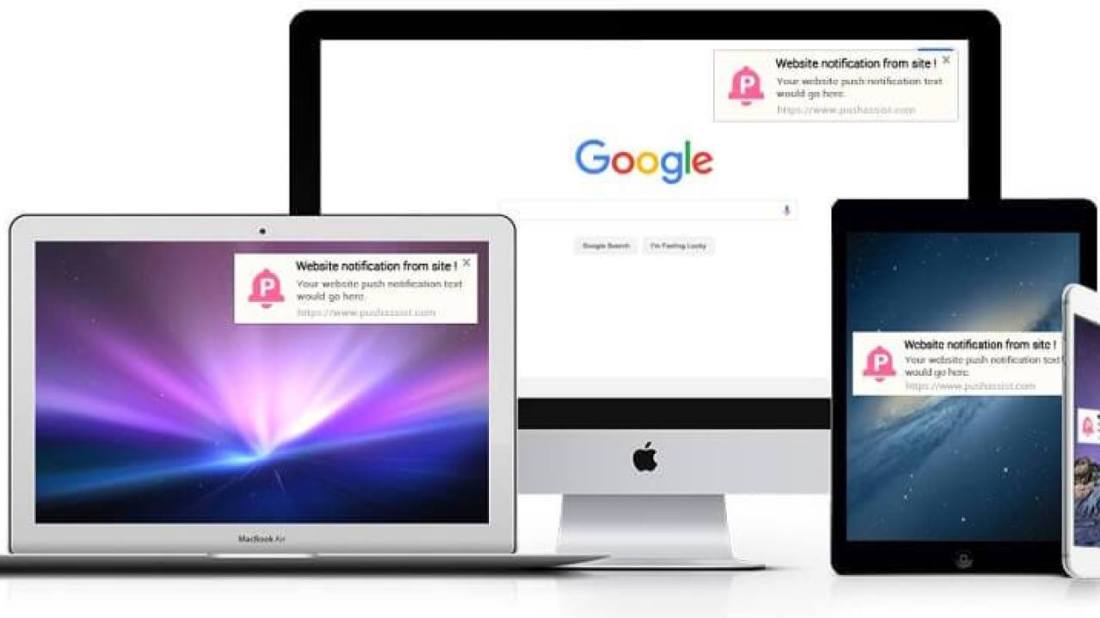
Push notifications are clickable pop-up messages that appear on your users’ browsers irrespective of which device they use or which browser they are on. Subscribers can be anywhere on the browser and still receive these messages as long as they are online or have their browsers running on their devices.
Browser push notifications are different from in-app notifications because in-app notifications appear only when triggered by an existing application on your mobile device, while browser push notifications can be triggered through browsers on any device as long as the user subscribes to receive your notifications. It is an instant mode of automated, direct communication between a website and its end users.
The digital marketing channel of online push notifications is newer than most existing channels. Even though it has gained significant momentum over the last few years, there is still a wide gap in strategic implementation between this newer method and others. Marketers are still discovering use cases for push notifications, but it has been observed to increase repeat visits, user retention, and re-engagement. This guide will tell you all that you need to know about push notifications.
Types Of Push Notifications
There are three types of push notifications – Web Push Notifications, Desktop Push Notifications, and Mobile App Push Notifications. Let us now look at each of these in detail:
1. Web Push Notification:
With web push notifications, you can send alerts on mobile as well as desktops even when users are not on your website. With zero installations required, users simply need to give their consent in a single click to receive notifications. Web push notifications can be sent to users without the need to build an app as they are sent directly to their browsers. These notifications are mainly used by marketers to increase website engagement and encourage visitors to keep coming back to their website, thereby increasing conversions. It’s fairly easy to build web push notifications for your website and can be done even by those with little or no technical background. This is what makes web push notifications such a handy tool for marketers.
2. Desktop Push Notifications:
Unlike web push notifications, desktop push notifications appear only on your users’ desktops. These notifications are driven mainly by the products that you have installed on your desktop, with the aim of driving customer engagement. Desktop push notifications are fairly difficult to build when compared to web push notifications and require developer’s help.
3. Mobile App Push Notifications:
Like desktop push notifications that are triggered by a product you have installed, mobile app push notifications, too, are triggered by existing/downloaded applications on your device. These notifications are crafted and sent with the aim of increasing customer engagement. Mobile app push notifications, like desktop push notifications, are fairly difficult to create when compared to web push notifications and require developer’s help to be built.
Businesses around the world are continually looking for ways to advertise their products and services. This often implies finding new ways of reaching out to their potential clientele. We’ve all tried email marketing, blogging, creating different kinds of content, but not everyone really considers SMS.
Tips to Leverage the SMS Marketing Power
Now you know how SMS marketing will help you – but how do you reap the most out of it? Since not every SMS marketing campaign is equal to the other, we need to look at how a business can maximize its success with text message marketing.
Create a Team
It’s safe to say that SMS marketing can be done by a single person, but to increase its effect, you need a strong team. You’ll likely need a marketing program expert, on-location signage coordinators, retail experts, social media experts, and so on.
A team of experts can guide you through the process and calibrate your campaign, in accordance with your needs and expectations. Copywriting for SMS marketing campaigns can be complicated. There are now many tools and services like Trust My Paper, Grammarly, Studicus, and Hemingway that can help you create more appealing marketing copies.
Know Your Customers
For your SMS marketing strategy to be successful, you will have to send the right message to the right category of customers. Analyze location-based demographics and purchase history and use that information to send the right message to your potential clientele.
Write Clear Messages
You have a total of 160 characters that you need to use to express yourself efficiently. If you can, you may even do it in less. We’re living in the Attention Economy; people aren’t really into reading long messages.
Tell them exactly what they need to know – and don’t leave anything of importance out. Use the most appropriate language to awaken their sense of urgency.
Use Call-to-Actions
Call-to-actions have a particular way of stimulating people into taking action. CTA’s are essential in all marketing channels, and using them will considerably impact your response rates.
Get the Timing Right
Nowadays, timing is everything. Without proper timing, you might miss out on an excellent opportunity. Since SMS is all about immediacy, you really want to think your timing though, especially if your recipients are distributed in several time zones.
Final Thoughts
SMS marketing is here, and it’s here to stay. It’s time that you make peace with this fact, accept it, and learn how to use it. If you do a good job, you will notice a significant increase in your sales – and all you had to do was to send a couple of texts.
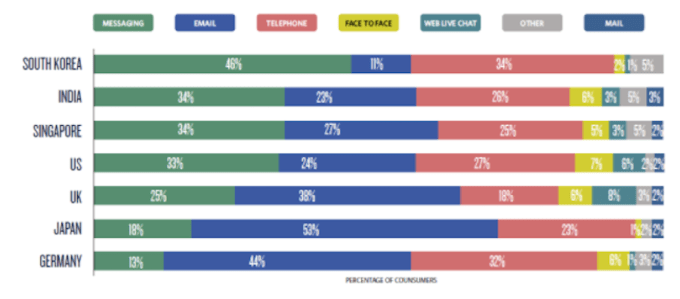
According to a study by Twilio, nine out of ten customers would like to be able to communicate with businesses through text messaging. And the majority of those customers prefer SMS as their texting medium.
Here’s how those percentages are divided based on country:
If you haven’t started with text message marketing to communicate with your customers for your eCommerce business, here’s everything you need to know:
Let’s look at
What advantages does SMS offer eCommerce businesses?
How can you use SMS to communicate with customers?
Text message templates for eCommerce
Looking for an SMS service for eCommerce? Try Call Hub
What advantages does SMS offer eCommerce businesses?
Why use text messages for eCommerce?
They are immediate.
90% of all texts are read within 15 minutes. Having a flash sale? You waste no time getting information to customers.
They are broad
Most users of smartphones still use text messaging, despite access to instant messaging apps like WhatsApp.
They are personal
Competing with giants like Amazon is tough. They set a high bar for customer expectations. One way you can meet those expectations is by having personalized and direct communication with customers through texts.
They are engaging
SMS is built for two-way communication. Have conversations with customers through text, i.e., responding to customer support tickets.
They are accessible.
Text messaging can reach anyone who has access to a mobile phone, And 91% of Americans have a mobile phone at hand at all hours of the day.
They are effective.
Text messages have a 98% open-rate, while for email, it ranges from 15-22%. Since most people are used to texting each other, they will be acquainted with using it as a communication medium.
What do you need to get started with SMS marketing for eCommerce?
For eCommerce businesses, using SMS marketing does not involve sending texts from your cell phone. Instead, you will be using a texting tool (like CallHub), to set up campaigns.
Here’s what you need to get started with SMS marketing:
A texting tool (like CallHub): This will give you a secure dashboard and enable you to set up multiple texting campaigns. Your tool will let you access campaign analytics as well as give your agents a single platform to use.
A CRM (like Salesforce): This integrates with your SMS platform and enables you to map every response back to each customer. You can also use the CRM to segment your audience and send alerts and notifications based on customer behavior.
And that’s it.
For basic use cases, like sending sale alerts, a CRM is not strictly necessary. You can download your contacts from your database and simply upload them to your texting tool. But a CRM can refine your SMS communication.
Once you have the tools in place, you can send out targeted SMS campaigns to your contacts and keep them engaged.
How can you use SMS to communicate with customers?
It is possible to use text messaging as both an avenue to generate more sales as well as a customer management tool for your business. That’s because text messaging is built for two way communication in addition to normal broadcasts.
You can use SMS to:
Have two-way conversations with customers.
Send out broadcast messages to your customer base.
Send personalized updates to customers.
Here are some use cases where you might use SMS for eCommerce communication:
To remind customers of abandoned carts
Cart abandonment is an issue all eCommerce businesses have to deal with. Sending a text message is one way to remind customers to finish a purchase.
To provide customer support
Your agents can have conversations with customers through text messages and provide instant support.
To send out sale/event alerts
This is the easiest way you can use SMS for eCommerce. You can send out a broadcast message to all the customers who have subscribed to your SMS alerts and let them know about a new sale.
To attract customers with images
If your text messaging software lets you send MMS, utilize it to grab your customer’s attention through images and video snippets.
To send order updates
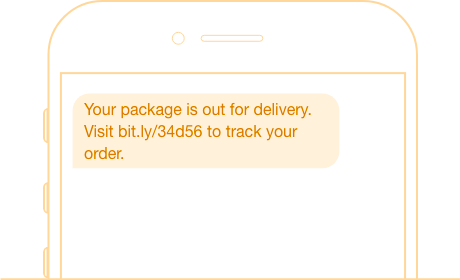
If customers opt-in to updates, send them an SMS, letting them know about the expected delivery date, along with a link to track their package.
To gather feedback
You can set up and SMS survey to get feedback from customers on their experience with the product or the delivery.
To send product recommendations
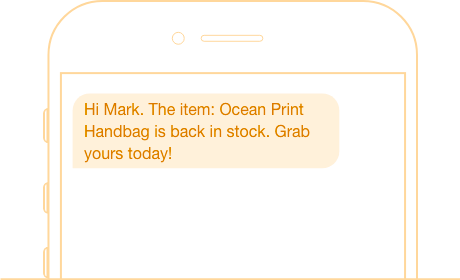
Send customers product updates and recommendations through text based on items in their wishlist.
Text message templates for eCommerce
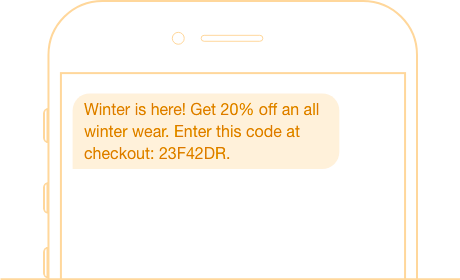
Your e-commerce business can use text messaging to manage everything from sale alerts to sending out discount codes and shipping notifications.
Here are some templates you can use for your messages:
Summer sale alert! All back to school items off, this week only! Order now and shipping is absolutely free. bit.ly/hp75fl
Hi Mark, thank you for your order! Your package is out for delivery. Here’s your tracking number: 23523562
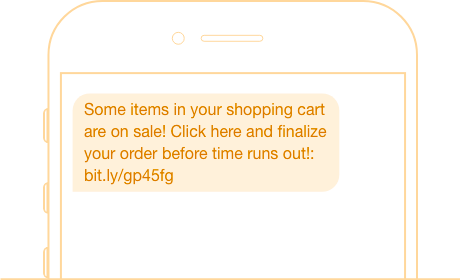
There are some items in your shopping cart which are on sale. Click here and finalize your order before time runs out!: bit.ly/gp45fg
Take 50% off your next purchase using coupon code GD454L2. Expires on 21/12.
Happy birthday! Here’s a 10% discount code for all items in our shop: 3242352GQ42. Best wishes from the AmazeKart team
Looking for an SMS service for eCommerce? Try CallHub
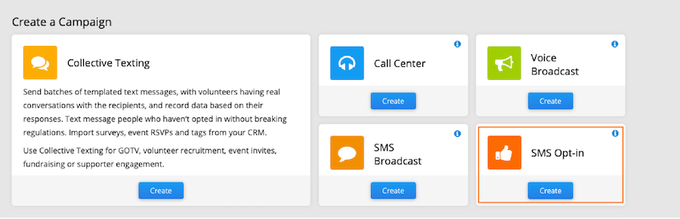
Setting up and using an SMS system for your business is simple. The first thing you need to do is getting customers to subscribe to your SMS updates. One way to do that is through an opt-in campaign.
1. Set up an Opt-in keyword and shortcode.
Choose the SMS Opt-in campaign on the CallHub dashboard.
To set up an opt-in campaign, you need to have just two elements:
A keyword
A shortcode or long code (to act as Caller Id)
For example, ‘Text “JOIN” to 562498 for updates and reminders.’
Here, the keyword is “JOIN,” and the number is “562498”.
You can set a keyword of your choice while setting up your eCommerce SMS system and rent a shortcode or long code from your text messaging service. If not, you can use a cell phone number as the caller ID.
Once you finish setting it up, go ahead and promote your keyword and shortcode. When people text in your keyword to the number, they will automatically be added to your database.
2. Ask customers to sign up to your communications.
Let customers know about the SMS system advertising it wherever you can:
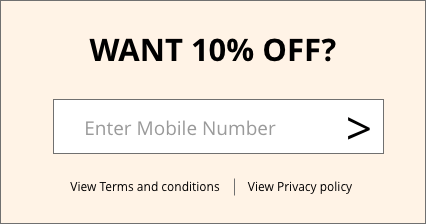
Have a pop-up or form on your website, preferably with an incentive.
Ask them if they want updates on the delivery after making an order.
Advertise your opt-in campaign through social media channels.
Now you’re all set to start sending updates straight to your customer’s mobile phones
3. Send your first message.
You can send messages through the SMS broadcast campaign on the dashboard.
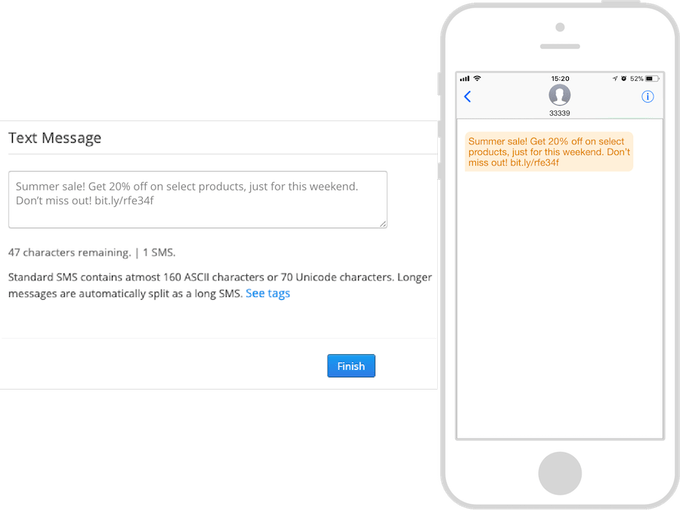
Type out the message you want to send, for example, alerting customers about a sale:
“Summer sale! Get 20% off on select products, just for this weekend. Don’t miss out! bit.ly/rfe34f.”
Choose the list with the numbers of the customers you want to send the message to.
Now schedule a time you want the message to go out and hit DONE.
Sending out a group text to your eCommerce customers is as simple as that.
Want to try out CallHub for your business? It’s easy to get started. You can try it out for free by signing up.
Setting up an eCommerce store on Shopify is simple. There are several resources available to walk you through setting up a navigable and sleek storefront. But, successfully growing your Shopify store is another ballgame.
Some of the biggest stores have a robust set of marketing channels – email, SMS, and social media, to name a few – to ensure they are maximizing their reach and bringing in more engagement. But just bringing in new visitors doesn’t cut it – you also need to be able to retain and retarget these store visitors.
The first step to setting up push notifications is to build your subscriber list.
When you first enable any push notification app, the app adds the browser prompt to your store by default. The browser prompt is a permission window that is displayed to your store visitors when they visit your site. Here’s what it looks like:
Since browser prompts are native to each browser, they are not customizable. This means that you have little control over what is displayed to your visitor. But, within the PushOwl app, you can add customizations based on your brand voice and preferences.
For instance, you can set a delay so that the browser prompt isn’t shown as soon as the visitor lands on your store. This delay allows your visitors to spend a few minutes browsing your store and in turn, makes it more likely that they would opt into your push notifications instead of hastily dismissing it.
Step 2: Set up Automation
Before you start sending promotions, you can set up some powerful automation that will trigger notifications based on customer activity.
1. Welcome Notification
First impressions leave a lasting impact. So, as soon as your store visitor subscribes, it’s important that you greet them with a welcome notification that is automatically triggered. Many stores use this welcome notification to greet their new subscriber with a fun message while other stores provide their subscribers with a discount code for their next order.
2. Abandoned Cart Reminders
Recovering your abandoned carts is a crucial part of store ownership. Just like email, push notifications allow you to set up re-targeting to engage shoppers who have abandoned their cart. With push notifications, you can set up a sequence of 3 reminders at different intervals to have a chance to bring your shoppers back and recover your carts easily.
One of the most common tactics used by merchants is to provide a discount code or free shipping on the shopper’s cart with the second or third reminder.
3. Flow
Ever wanted to send shoppers messages that are triggered based on their activity on your store? With Shopify Flow, you can easily set up automated push notifications based on different behaviors- from providing a loyalty discount for purchasing from you to sending a message notifying them about their order confirmation, delivery, and even return.
With Flow, you need to set up your preferred workflows once, and your customers can stay informed about their orders and any special discounts as you process it in the backend.
Step 3: Convert Subscribers with Attractive Promotions
Building your subscriber list is easy once you’ve set up your widgets.
According to a statistic, 5 to 15% of your store visitors are likely to opt-in to your push notifications.
Once your subscriber list starts growing, it’s time to send push campaigns to these subscribers to bring them back to your store and convert them into customers.
1. Flash Sale
There’s no doubt about it – shoppers love flash sales! Campaigns with an expiry date create urgency in your shoppers and make them check out faster so that they don’t miss the deal. Many stores run weekend sales and use the Flash Sale feature to send out push notifications with an expiry date.
Add the discount code and the expiry time in the title copy. With flash sales, stores don’t have to explain too much about the sale since the title and the message create enough urgency to persuade subscribers to make a purchase.
2. Event Promotion
Campaigns that get the best traction are ones that are relevant and timely. This is why a notification promoting your store’s Christmas sale or a Black Friday sale gets more clicks and revenue than a regular old campaign.
Make the most of this attention by sending out timely campaigns based on these events. Some stores even run campaigns during fun holidays and events, like No Shave November or Fashion Week.
3. Product Engagement
Whether you’re launching your new product or promoting an existing product, sending a push notification with an attractive hero image and a catchy caption is bound to make your subscribers more intrigued about your product, prompting them to get it for themselves.
Use the title and message to paint an attractive picture of your product. You can even talk about the benefits of the product and what your subscribers will gain from owning it.
4. Product Advice
What unique quality or benefits do your products have? Do they have multiple functionalities? Or can you use the product with something else for a quick beauty hack? Promote these hacks with your subscriber base.
Sending out push notifications with exclusive tips can make your subscribers eager to receive your notifications and they are more likely to come back to your store. Even if they don’t purchase the product you’ve mentioned in the notification, you can expect them to browse the rest of the store and make a purchase while they’re at it.
No doubt you’ve come across the Shopify cart abandonment issue.
You know that four in every five customers might leave your store without finishing the purchase.
Frustrating, yes. But you shouldn’t panic just yet.
There are many tools and strategies that you can use to rescue abandoned carts and improve your sales. Abandoned cart chatbots connected with automated emails are one of the most effective ways. They can be integrated with any Shopify store.
Wigzo is a marketing automation app that uses numerous channels to recover lost sales. It has an omnichannel marketing strategy to resolve abandoned carts’ difficulties. The app also has customer segmentation functionality to split customers into groups based on their interests and purchases.
Features:
SMS notifications for abandoned cart with a link and discount
pre-built email marketing automation workflows that require minimum input from the user
custom abandoned cart emails with a link to the checkout page
automatic product import to emails to save time with email creation
Tidio is a live chat and chatbot app designed for small and medium-sized Shopify stores.
Tidio provides shopping cart abandonment emails in its Mailing feature. You can easily create automatic emails to remind your customers to finish purchases with a built-in visual email builder.
Features:
Sends a notification of an abandoned cart to customers who are about to leave the store with a chatbot.
Shows a custom message to returning visitors that you can use to welcome them or share news about a sale etc.
Can be used to build custom chatbots for cart abandonment.
Has a pre-made shopping cart abandonment chatbot template you can use to create a chatbot within minutes.
PushOwl is a simple Shopify push notification app. It can help with automating Shopify abandoned cart recovery messages, “back in stock” notifications, and product review notifications. The app is really easy to use and doesn’t require any personal information about customers to send messages to them.
Features:
custom abandoned cart notifications for Shopify stores
click rate and other customer interaction analytics to see which notification campaigns are working effectively
automatic image generation of the product’s that was added to the cart for the notification
custom time intervals for abandoned cart notifications
notifications of product availability and shipment status
cross-platform support to send push notifications to any device
Omnisend is a Shopify abandoned cart app that uses emails to recover sales. You can choose emails to use from a nice collection of templates. The app also has customer segmentation functionality to divide customers into groups based on their interests and purchases. Custom pop-up notifications are available to help with growing the list of subscribers.
Features:
pre-built email marketing automation workflows that require minimum input from the user
custom abandoned cart emails with a link to the checkout page
automatic product import to emails to save time with email creation
SMS notifications as a part of the abandoned cart Shopify sequence
Campaign Monitor is a good Shopify abandoned cart app to use for recovering sales with email marketing. It uses your Shopify customer data to create segments for more targeted campaigns. No coding is needed to create the campaigns, as the tool comes with dozens of mobile-ready templates and an intuitive email builder.
Features:
automatic creation of custom Shopify customer segments such as first-time customers, repeat customers, and high spenders
automated emails to share with customers
email templates to create new campaigns quickly and efficiently
automated receipts for Shopify orders
Integration of customer reviews in emails to build trust and reputation
pop-up forms for Shopify stores to get more subscribers







 Personalization